Somewhere in your business right now, an invoice is waiting for a signature and a request is buried in a thread. Business process automation (BPA) is software that moves such work from step to step without anyone chasing or re-keying it. The cost of doing without it is measurable: Ardent Partners’ 2025 research, summarized by apexanalytix puts one invoice at $9.40 to process for the average finance team and $2.78 for a best-in-class one, a gap of more than three times. Much of that gap sits in handoffs.
The delay shows up in cycle time. Ardent Partners’ 2025 data, compiled by Parseur puts best-in-class teams at 3.1 days per invoice against 17.4 for manual-heavy ones.
BPA removes those handoffs, and it is no longer limited to large enterprises or finance. A 22-person Queensland accounting practice cut invoice turnaround from two or three days to under four minutes, as Cognition Co’s published case study reports. In McKinsey’s 2025 State of AI survey, the organizations getting the most value from AI were nearly three times as likely to have fundamentally redesigned their workflows.
This guide focuses on the practical side of BPA: what it is, how it works, how it differs from RPA, where it delivers the most value, and how to implement it in five steps.
What Is Business Process Automation (BPA)?
Business Process Automation (BPA) is software that runs a complete, multi-step business workflow from start to finish, replacing manual tasks, paper routing, and repetitive data entry.
The distinction that matters is scope. Task automation speeds up one action, such as copying a form entry into a spreadsheet. Business process automation handles the whole process across every system, with no person stitching the steps together.
That is why teams are moving from daily firefighting (chasing approvals, fixing copy-and-paste errors) to workflow automation, a core part of any digital transformation effort. Most organizations pass through four stages:
| Stage | What It Looks Like | Typical Tools |
|---|---|---|
| 1. Manual / Ad Hoc | Email, spreadsheets, and handoffs carry the work | None; fully human-driven |
| 2. Task Automation | Single steps are automated; a person links them | Zapier, Make |
| 3. End-to-End BPA | A full workflow runs across systems automatically | Microsoft Power Automate, ServiceNow |
| 4. AI-Driven Hyperautomation | Software reads documents and free text and makes routine calls | OCR and AI added to a BPA platform |
Use the model as a diagnostic: jumping to Stage 4 without a stable Stage 2 automates a messy process faster instead of fixing it.
How BPA Works: Triggers, Rules, and System Integrations
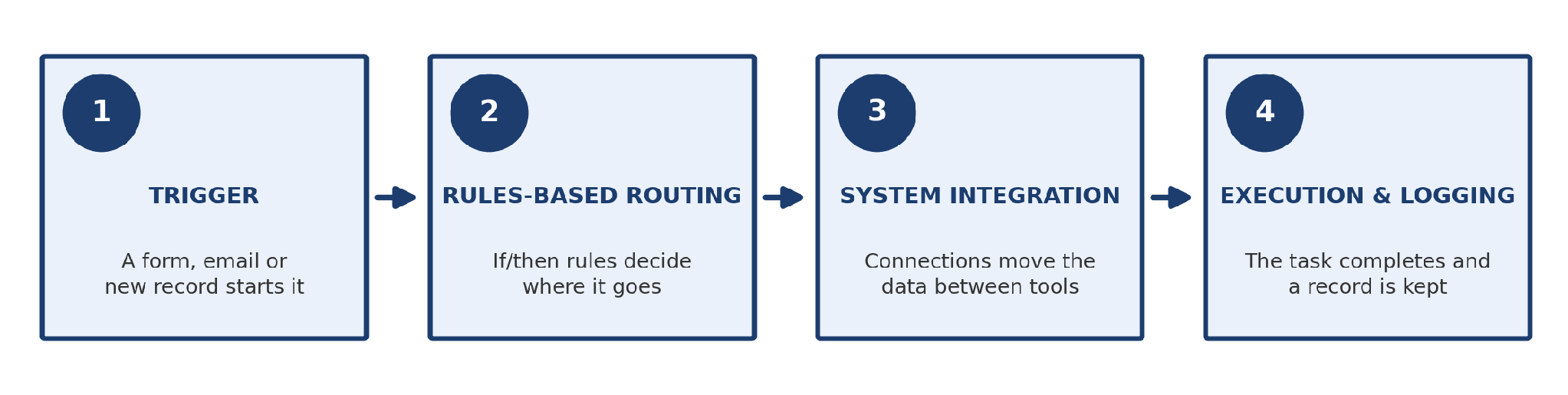
Every automated workflow runs on three parts: a trigger that starts it, rules that decide where it goes, and system integrations that move the data.
- Triggers: Events that launch a process, such as a form submission or incoming invoice email.
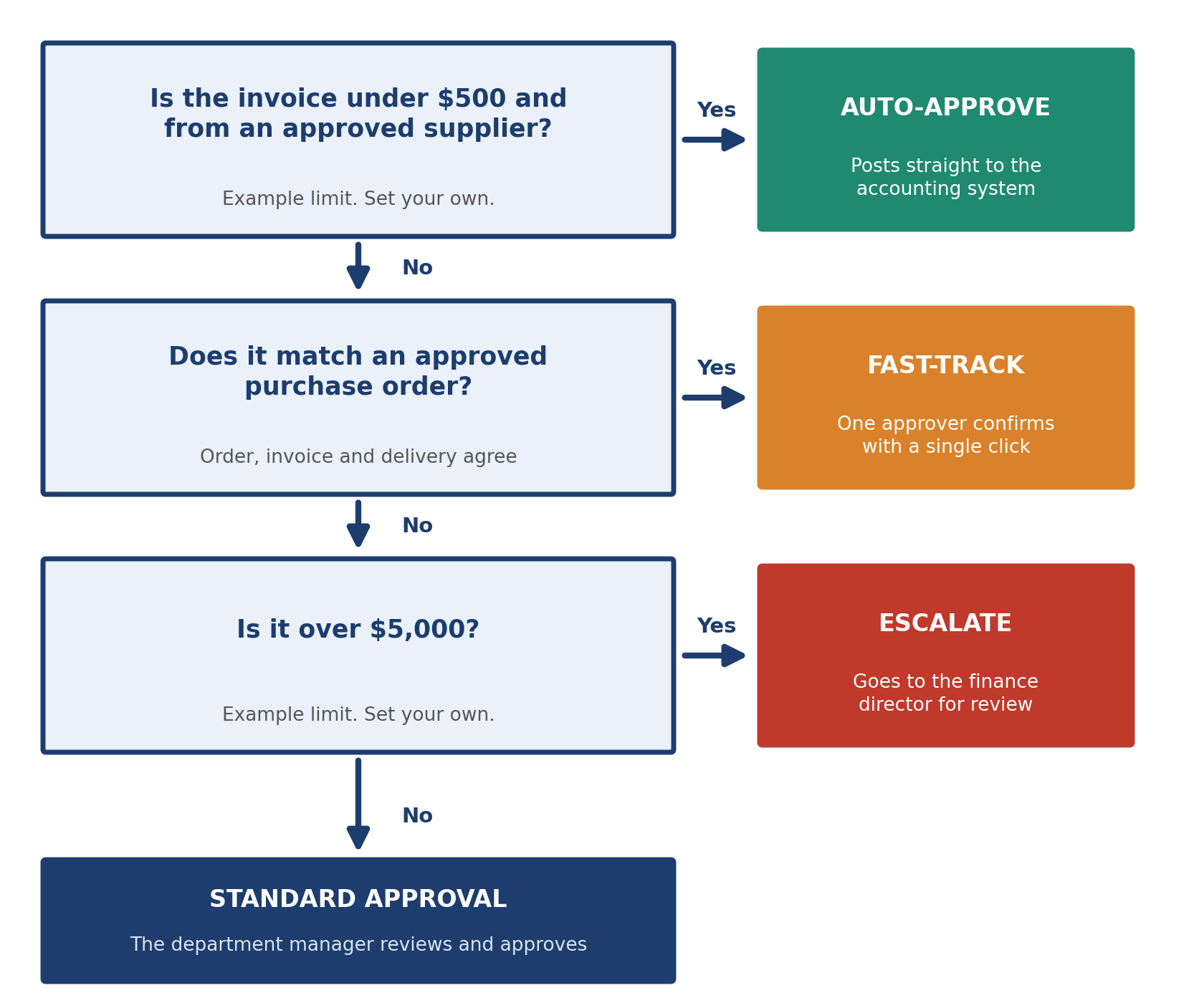
- Rules-Based Logic: If/then branching that decides which path a case takes, based on amount, category, or risk.
- System Integration: Moving data between tools using an Application Programming Interface (API), webhooks, or database connectors.
Execution and logging follow from the first three, and every business process automation software platform or workflow automation tool, whatever its branding, works this way.
Standardize data first. A workflow fed by a structured form runs reliably; free-text email breaks it when phrasing changes.
Use this Process Readiness Scorecard: score one point per true signal. A score of 4 or 5 marks a strong candidate, 3 means fix the gaps first, and 2 or fewer means clean up before you automate.
| Readiness Signal | Automation-Ready Looks Like |
|---|---|
| Volume | Runs dozens of times a month or more |
| Standardization | The same rules apply almost every time |
| Digital inputs | Data arrives in a structured, digital format |
| Clear ownership | One team owns the process end to end |
| Stable rules | Policy does not change every quarter |
When the workflow is built well, the payoff is straight-through processing (STP): cases that finish untouched. In Ardent Partners’ 2025 research, 32.6% of invoices needed no human involvement on average, and 49.2% at best-in-class teams. Even the leaders route half to a person, so exception handling matters as much as automation.
BPA vs. RPA vs. AI Automation: What’s the Difference?
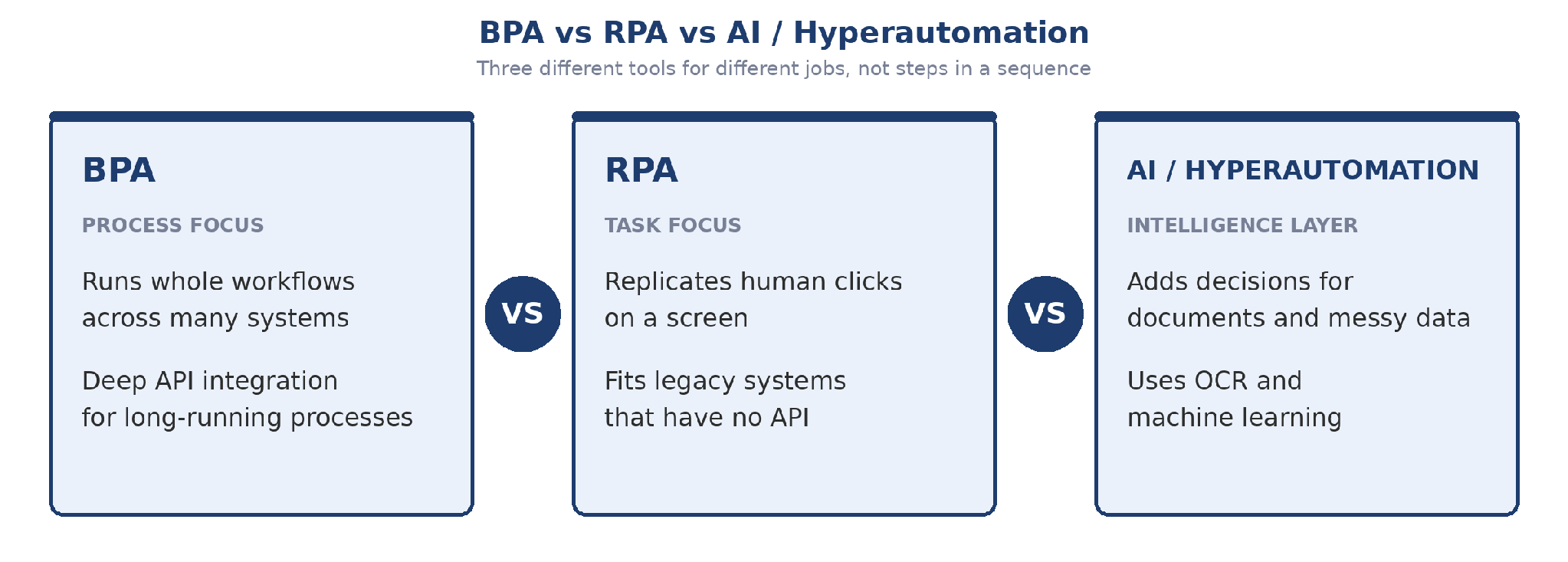
BPA, RPA, and AI-driven hyperautomation solve different problems: BPA runs whole workflows, RPA automates individual tasks, and hyperautomation adds AI for documents and messy data.
Clarifying the jargon prevents costly technology selection errors:
- BPA (Business Process Automation): Connects modern cloud systems through APIs to manage a process from start to finish, such as routing an invoice from receipt to payment.
- RPA (Robotic Process Automation): Software “bots” that copy human mouse clicks and keystrokes in older desktop software that has no API. UiPath is a well-known example.
- Hyperautomation: Combines BPA, RPA, and AI, including Optical Character Recognition (OCR), to handle unstructured data that plain rules cannot parse.
| Dimension | BPA | RPA | AI / Hyperautomation |
|---|---|---|---|
| System depth | Deep: connects through APIs | Surface: works on the screen like a user | Deep, plus reads documents |
| Implementation speed | Moderate; map the process first | Fast for simple bots | Slowest; needs clean data |
| Cost | Moderate, scales well | Low per bot, hard to maintain at scale | Highest upfront, highest ceiling |
| Flexibility | Flexible across systems | Brittle; can break after small UI changes | Handles messy input |
None of the three is “better.” They trade cost, speed, and operational efficiency, so many teams run all three side by side. Use this matrix to choose:
| Your Situation | Choose | Example Tools |
|---|---|---|
| Modern systems with APIs, several tools | API-first BPA platform | Microsoft Power Automate, ServiceNow, Camunda |
| Key system is old, with no API | RPA bot | UiPath |
| Small process, few cloud apps, no IT team | No-code BPA | Zapier, Make |
| Process lives inside one platform | Built-in workflow tools | Salesforce Flow, SAP |
| Inputs are scans, PDFs, or emails | BPA plus AI and OCR | BPA platform with OCR added |
Real-World Business Process Automation Examples by Department
The clearest business process automation benefits (faster processing, fewer errors, and a lower cost per transaction) show up first where work is repeated and rule-based: HR, finance, sales, support, and operations.
- Human Resources: Onboarding that generates contracts, IT requests, and accounts from one trigger.
- Finance & Accounting: AP invoice processing, expense approvals, and reconciliation, posted to NetSuite or SAP.
- Sales & Marketing: Lead scoring, CRM data enrichment, contract routing, and deal-desk approvals.
- Customer Support: Ticket triage, sentiment-based routing, and refund processing.
Before-and-After Time Audit: Invoicing. Invoicing is the easiest of these examples to measure. A 22-person accounting practice in Queensland was losing 18 hours a week to billing admin. Cognition Co replaced it with an automated workflow: completed job triggers it, rules calculate the invoice, integrations connect practice software to Xero and email, and every step is logged. Invoices now go out within four minutes of a job closing.
The same shift shows up on the supplier side. At REVA Air Ambulance, Ramp’s published case study reports invoice handling falling from 15 to 20 minutes to under three, and month-end close moving from nearly three weeks late to the 4th or 5th of the month. Whether invoices go out or come in, the gain comes from removing handoffs.
| Measure | Before | After |
|---|---|---|
| Invoice turnaround | 2–3 days | Under 4 minutes |
| Weekly billing admin time | 18 hours | Approvers see only exceptions |
| Supplier invoice handling | 15–20 minutes | Under 3 minutes |
| Month-end close | Nearly three weeks late | By the 4th or 5th of the month |
| Department | High-ROI Process | What Changes |
|---|---|---|
| HR | Employee onboarding | Contracts, accounts, and equipment requests fire from one trigger |
| Finance | AP invoice processing | Rules read, match, and route invoices; best-in-class teams pay ~70% less per invoice |
| Sales & Marketing | Lead scoring and routing | Leads are scored and routed to the right rep instantly |
| Customer Support | Ticket triage | Rules route each ticket before a person reads it |
| Operations | Purchase requests and reordering | Requests route by amount and budget; reorders trigger at set stock levels |
How to Implement BPA in 5 Simple Steps
How to implement business process automation takes five steps: map the process, choose the tool, redesign the workflow, build and test, then measure.
- Step 1: Identify & Map the Process. Use process mapping to document every step of the current process, including exceptions, to see where bottlenecks sit.
- Step 2: Choose the Right Tooling Stack. Use no-code tools (Zapier, Make) for simple triggers, low-code (Microsoft Power Automate) for departmental workflows, and enterprise platforms (ServiceNow, SAP, Salesforce) for large, regulated processes. Confirm the tool connects to your existing systems.
- Step 3: Redesign for Automation. Simplify the workflow before digitizing it. Never automate an inefficient process; it only fails faster.
- Step 4: Build, Test & Launch. Build in a sandbox, then run manual and automated versions in parallel before cutting over.
- Step 5: Measure, Audit & Optimize. Track time saved, error rates, and adoption to prove return on investment (ROI) and catch slippage when the workflow stops matching how work is really done.
The Golden Rule of Process Simplification: Eliminate at least two non-essential approval steps before writing a single automation rule. McKinsey’s 2025 State of AI survey tied the most AI value to redesigned workflows.
The 10-Point Pre-Launch Automation Checklist for Operations Teams
- Process mapped end to end, including exceptions.
- One named owner is accountable.
- At least two non-essential approval steps removed.
- Input data is standardized and digital.
- Approval limits and routing rules documented and signed off.
- Every system has a working connection and access.
- Workflow built and tested in a sandbox, not live systems.
- A parallel run shows matching automated and manual results.
- Exceptions have a defined path, a named handler, and a manual fallback.
- Baseline time, error, and cost numbers recorded; affected people briefed and trained.
Frequently Asked Questions
What is the main goal of business process automation?
The main goal of business process automation is to run repetitive, multi-step work faster, more accurately, and with less manual effort, so people can focus on decisions and exceptions. Every step also leaves an audit record.
What is the difference between BPA and RPA?
The difference is scope and method: BPA orchestrates a whole workflow across connected systems, while RPA automates individual tasks by imitating a user on screen. Many teams use both, with RPA covering the legacy screen and BPA coordinating the rest.
What are the best software tools for business process automation?
The best business process automation software depends on the process: no-code tools such as Zapier and Make suit simple app-to-app workflows, Microsoft Power Automate suits departmental ones, ServiceNow and Camunda handle enterprise-scale processes, and UiPath covers legacy screens.
Will business process automation replace human workers?
In most cases it changes roles rather than removing them: automation takes over repetitive, rule-based tasks while people move toward exceptions and judgment. Roles built around manual data entry are most exposed, so plan retraining with the rollout.